Sub-Total: $0.00
Anthropics Technology releases ‘fastest yet’ PortraitPro
28 October 2026
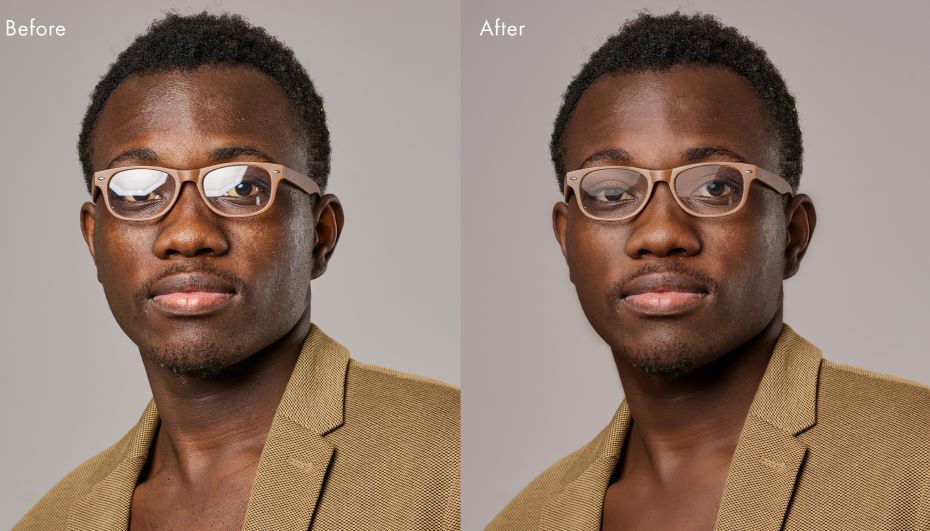
Software R&D company, Anthropics Technology, has released PortraitPro 27, the latest version of its AI-powered portrait editing software for Windows and macOS. The software tool has been rebuilt on a new AI engine, so the work it does on every face takes far less time, making it the fastest PortraitPro yet.
PortraitPro 27 also brings built-in GPU acceleration, a redesigned workspace that keeps every tool within easy reach, and quicker editing of group photos. The release comes as many new AI image tools ask photographers to describe the result they want in a text prompt, then charge a credit for every attempt or lock portrait features behind a monthly subscription. PortraitPro takes the opposite approach. Its AI finds the face and its features automatically, and the photographer decides exactly what changes, adjusting skin, eyes, lighting, hair, makeup and face shape with sliders and seeing the result update in real time. Edits can be refined as often as needed, and a single payment buys a perpetual licence with no subscription.
Helen Baird, Creative Director at Anthropics Technology, says: “Photographers already know the look they want. They shouldn’t have to type it out, wait, and pay again every time the machine guesses wrong. PortraitPro 27 uses AI to do the heavy lifting faster than ever, but the photographer stays in charge of every decision. And once you’ve bought it, it’s yours.”
Featuring a new, faster AI engine, the AI models that find faces, build the skin and hair masks and remove noise now run on this new engine. Face detection is faster, especially in half-length, full-length and group photos, and enhancements render more quickly. GPU acceleration has been built in and on Windows, every edition now uses the computer’s graphics card automatically, with no separate GPU version to install, and falls back to the processor if there is no suitable card.
From a purely functional perspective, a new tools strip puts Touch Up, Restore, the masks, Crop, Clone, Remove Noise, Replace Sky, Art Effects and the Lighting Brush in one place. Before and After buttons now replace the old tabs, leaving more room for the photo, and slider values and button labels are shown from the start.
The new version also features a new faces strip, which shows every face in the photo while it is being edited, so the photographer can switch to another face in one click. Faces that have not been changed are not processed again, so switching is much faster. Plus there is now clearer guidance for marking up faces in profile, clearer help when a RAW file needs Adobe’s free DNG Converter (Studio and Studio Max), and a more reliable batch mode (Studio Max).